---
title: Editing a microchip as an animal rescue
description: Updating a microchip you registered within microchips
---

[Skip to content](https://support.mypethq.io/editing-a-microchip-as-a-microchip-implanter-0#main-content)

English - United Kingdom

Show submenu for translations

[Customer portal](https://supportportal.mypethq.io/tickets-view?hsLang=en-gb)

![sage logo](https://support.mypethq.io/hs-fs/hubfs/sage%20logo.png?width=65&height=77&name=sage%20logo.png)

- [Back to main website](https://mypethq.io/)

Open main navigation

Close main navigation

- [Back to main website](https://mypethq.io/)
- English - United Kingdom
  
  Show submenu for translations
- [Customer portal](https://supportportal.mypethq.io/tickets-view)
- [Support request](https://mypethq.io/open-a-support-ticket/)

[Support request](https://mypethq.io/open-a-support-ticket/)

 How can we help you?

- There are no suggestions because the search field is empty.

1. [Help Centre](https://support.mypethq.io/?hsLang=en-gb)
2. [I'm from an animal rescue](https://support.mypethq.io/im-from-an-animal-rescue?hsLang=en-gb)
3. [Registering MyPet Microchips](https://support.mypethq.io/im-from-an-animal-rescue?hsLang=en-gb#registering-mypet-microchips)

7 October 2025

# Editing a microchip as an animal rescue

## Registered a MyPet Microchip via our implanter tool and made a mistake. Now you can edit a past registration

If you've registered a microchip and made a mistake you can now update the pet and keeper details up until the owner confirms their email address. Here's how:

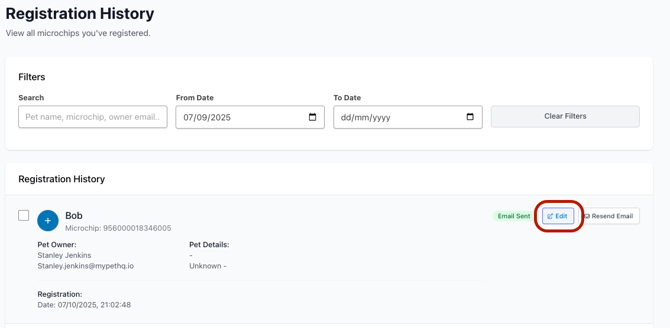
First head to registration history and find the microchip you want to edit and then click the new Edit Button.
![Screenshot 2025-10-07 at 21.03.02](https://support.mypethq.io/hs-fs/hubfs/Screenshot%202025-10-07%20at%2021.03.02.png?width=670&height=329&name=Screenshot%202025-10-07%20at%2021.03.02.png)

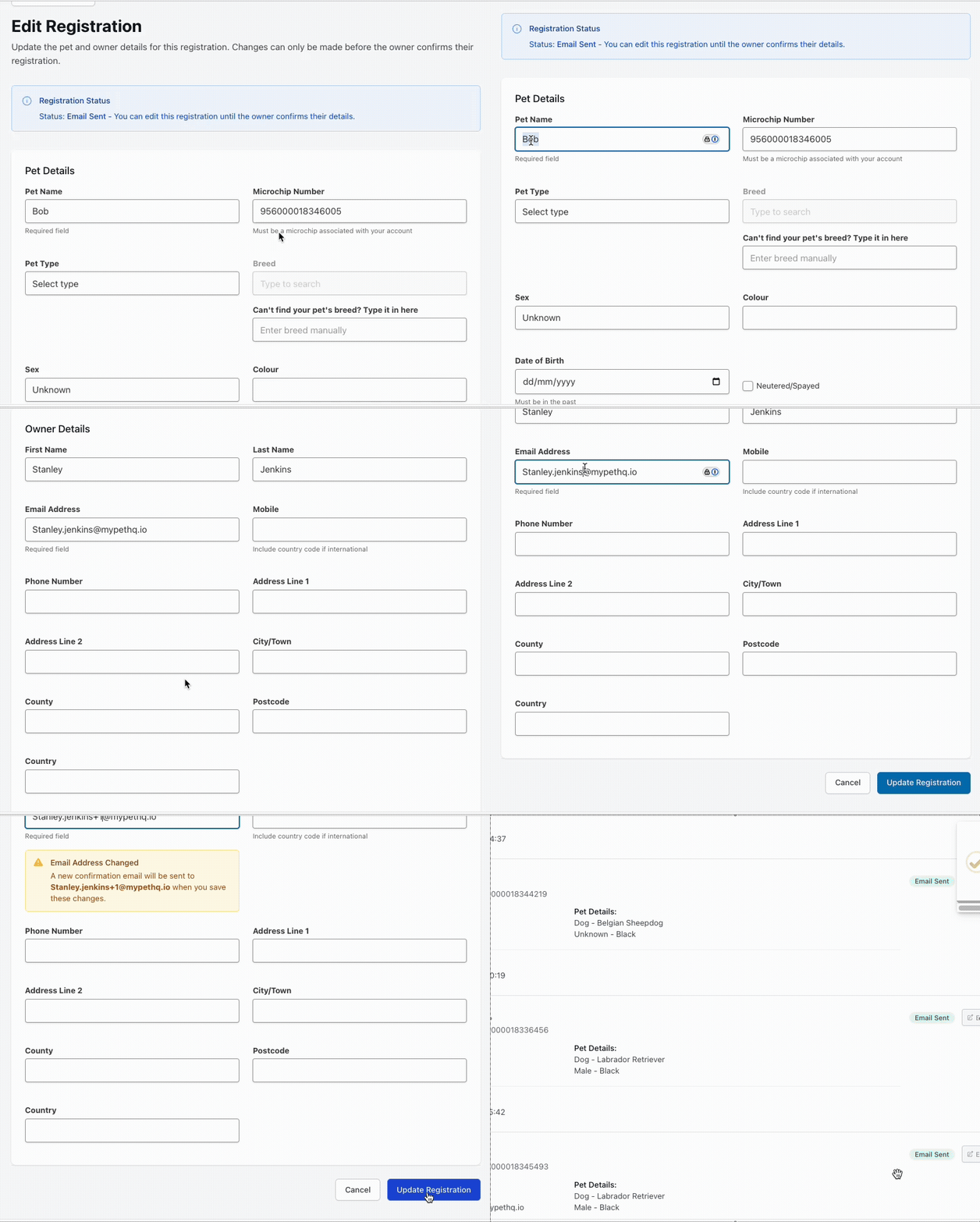
After you've clicked Edit you'll be take to a new page where you can update those details, up until the keeper clicks the link to confirm their email address. 

You can update all of the details including the pet and keeper details as shown below

When you update the email address we will send a new Registration confirmation to the pet keeper
![Implanter reg history edit](https://support.mypethq.io/hs-fs/hubfs/Implanter%20reg%20history%20edit.gif?width=670&height=557&name=Implanter%20reg%20history%20edit.gif)

Once you've amended the details click update registration and we'll get everything updated for you!

If you registered a litter, you will need to change all of the animals one by one if changing the email address for the keeper. 


- [I'm a pet owner](https://support.mypethq.io/im-a-pet-owner?hsLang=en-gb#main-content)

    - [Premium plans](https://support.mypethq.io/im-a-pet-owner?hsLang=en-gb#premium-plans)
- [I'm from a veterinary practice](https://support.mypethq.io/im-from-a-veterinary-practice?hsLang=en-gb#main-content)

    - [Using MyVet](https://support.mypethq.io/im-from-a-veterinary-practice?hsLang=en-gb#using-myvet)
- [I'm from an animal rescue](https://support.mypethq.io/im-from-an-animal-rescue?hsLang=en-gb#main-content)

    - [Registering MyPet Microchips](https://support.mypethq.io/im-from-an-animal-rescue?hsLang=en-gb#registering-mypet-microchips)
- [I'm a microchip implanter](https://support.mypethq.io/im-a-microchip-implanter?hsLang=en-gb)
- [I'm a breeder](https://support.mypethq.io/im-a-breeder?hsLang=en-gb#main-content)

    - [Implanter Registration tools](https://support.mypethq.io/im-a-breeder?hsLang=en-gb#implanter-registration-tools)
- [I'm a pet professional (Local council, Police etc)](https://support.mypethq.io/im-a-pet-professional-local-council-police-etc?hsLang=en-gb)
- [General](https://support.mypethq.io/general?hsLang=en-gb)

[![](https://support.mypethq.io/hs-fs/hubfs/main_logo_without_tagline.png?width=50&height=59&name=main_logo_without_tagline.png)](http://mypethq.io)

MyPet Headquarters Ltd

<https://www.facebook.com/> <https://www.twitter.com/> <https://www.instagram.com/> <https://podcasts.apple.com/> [mailto:email@email.com](mailto:email@email.com)

Copyright © 2025, MyPet