---
title: How Do I Get a Replacement Smart Pet Tag?
description: If your Smart Pet Tag has been lost, damaged, or you simply need a new one (for example, for a new pet you've added to your account), replacements are free as part of your MyPet Pampered plan.
---
[Skip to content](https://support.mypethq.io/how-do-i-get-a-replacement-smart-pet-tag#main-content)
English - United Kingdom
Show submenu for translations
[Customer portal](https://supportportal.mypethq.io/tickets-view?hsLang=en-gb)

- [Back to main website](https://mypethq.io/)
Open main navigation
Close main navigation
- [Back to main website](https://mypethq.io/)
- English - United Kingdom
Show submenu for translations
- [Customer portal](https://supportportal.mypethq.io/tickets-view)
- [Support request](https://mypethq.io/open-a-support-ticket/)
[Support request](https://mypethq.io/open-a-support-ticket/)
How can we help you?
- There are no suggestions because the search field is empty.
1. [Help Centre](https://support.mypethq.io/?hsLang=en-gb)
2. [I'm a pet owner](https://support.mypethq.io/im-a-pet-owner?hsLang=en-gb)
3. [Premium plans](https://support.mypethq.io/im-a-pet-owner?hsLang=en-gb#premium-plans)
15 April 2026
# How Do I Get a Replacement Smart Pet Tag?
## If your Smart Pet Tag has been lost, damaged, or you simply need a new one (for example, for a new pet you've added to your account), replacements are free as part of your MyPet Pampered plan.
Available for MyPet Pampered Members only
#### How to Request a Replacement
1. **Log in** to your account at [app.mypethq.io/login](https://app.mypethq.io/login)
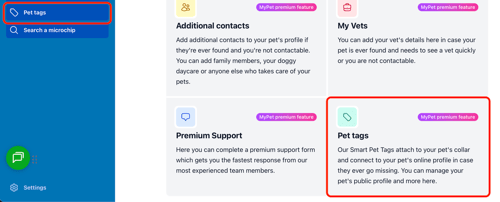
2. Click on Pet Tags from your dashboard or side menu as shown below
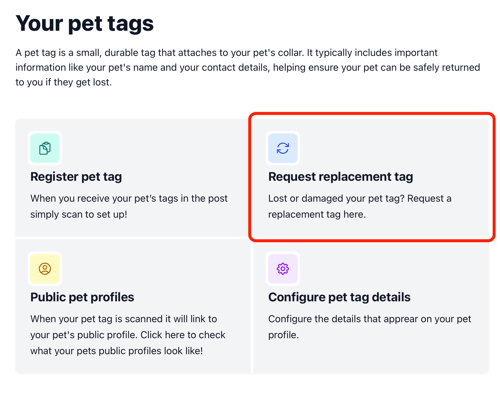
3. Next click **request** **tag replacement** option shown below
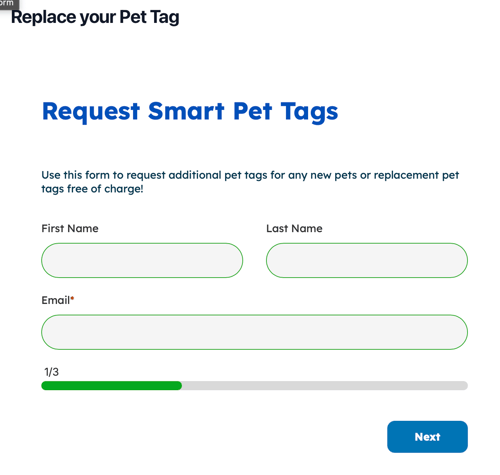
4. You can then fill out the form requesting new tags Once filled out we'll aim to ship within 24 hours.
Your replacement tag should arrive within **a few days**, and we'll email you tracking information so you know when to expect it.
---
#### Setting Up Your New Tag
When your replacement tag arrives, you'll need to link it to your pet:
1. **Scan the QR code** on the new tag with your phone's camera, or **tap the tag** against your phone
2. You'll be prompted to **log in** and **attach the tag to your pet**
3. Once linked, the new tag will point to your pet's existing public profile — all your configured details carry over automatically
---
#### Do I Need to Pay for Replacements?
No. Free replacement tags are included with **MyPet Pampered** at no extra cost, no matter how many times you need one. Whether the tag was chewed, fell off on a walk, or just needs replacing — you're covered.
---
#### Can I Get Tags for Multiple Pets?
Yes. Every pet on your Pampered account gets their own Smart Pet Tag. If you add a new pet to your account, just request a tag for them using the same process above.
- [I'm a pet owner](https://support.mypethq.io/im-a-pet-owner?hsLang=en-gb#main-content)
- [Premium plans](https://support.mypethq.io/im-a-pet-owner?hsLang=en-gb#premium-plans)
- [I'm from a veterinary practice](https://support.mypethq.io/im-from-a-veterinary-practice?hsLang=en-gb#main-content)
- [Using MyVet](https://support.mypethq.io/im-from-a-veterinary-practice?hsLang=en-gb#using-myvet)
- [I'm from an animal rescue](https://support.mypethq.io/im-from-an-animal-rescue?hsLang=en-gb#main-content)
- [Registering MyPet Microchips](https://support.mypethq.io/im-from-an-animal-rescue?hsLang=en-gb#registering-mypet-microchips)
- [I'm a microchip implanter](https://support.mypethq.io/im-a-microchip-implanter?hsLang=en-gb)
- [I'm a breeder](https://support.mypethq.io/im-a-breeder?hsLang=en-gb#main-content)
- [Implanter Registration tools](https://support.mypethq.io/im-a-breeder?hsLang=en-gb#implanter-registration-tools)
- [I'm a pet professional (Local council, Police etc)](https://support.mypethq.io/im-a-pet-professional-local-council-police-etc?hsLang=en-gb)
- [General](https://support.mypethq.io/general?hsLang=en-gb)
[](http://mypethq.io)
MyPet Headquarters Ltd
[mailto:email@email.com](mailto:email@email.com)
Copyright © 2025, MyPet