---
title: How do I transfer / rehome a pet to a new keeper / owner
description: Learn how to rehome a pet to a new owner
---

[Skip to content](https://support.mypethq.io/how-do-i-transfer-/-rehome-a-pet-to-a-new-keeper-/-owner#main-content)

English - United Kingdom

Show submenu for translations

[Customer portal](https://supportportal.mypethq.io/tickets-view?hsLang=en-gb)

![sage logo](https://support.mypethq.io/hs-fs/hubfs/sage%20logo.png?width=65&height=77&name=sage%20logo.png)

- [Back to main website](https://mypethq.io/)

Open main navigation

Close main navigation

- [Back to main website](https://mypethq.io/)
- English - United Kingdom
  
  Show submenu for translations
- [Customer portal](https://supportportal.mypethq.io/tickets-view)
- [Support request](https://mypethq.io/open-a-support-ticket/)

[Support request](https://mypethq.io/open-a-support-ticket/)

 How can we help you?

- There are no suggestions because the search field is empty.

1. [Help Centre](https://support.mypethq.io/?hsLang=en-gb)
2. [I'm a pet owner](https://support.mypethq.io/im-a-pet-owner?hsLang=en-gb)

23 November 2025

# How do I transfer / rehome a pet to a new keeper / owner

#### Step 1

First log into your account here: [https://app.mypethq.io/login](https://app.mypethq.io/login)

#### Step 2

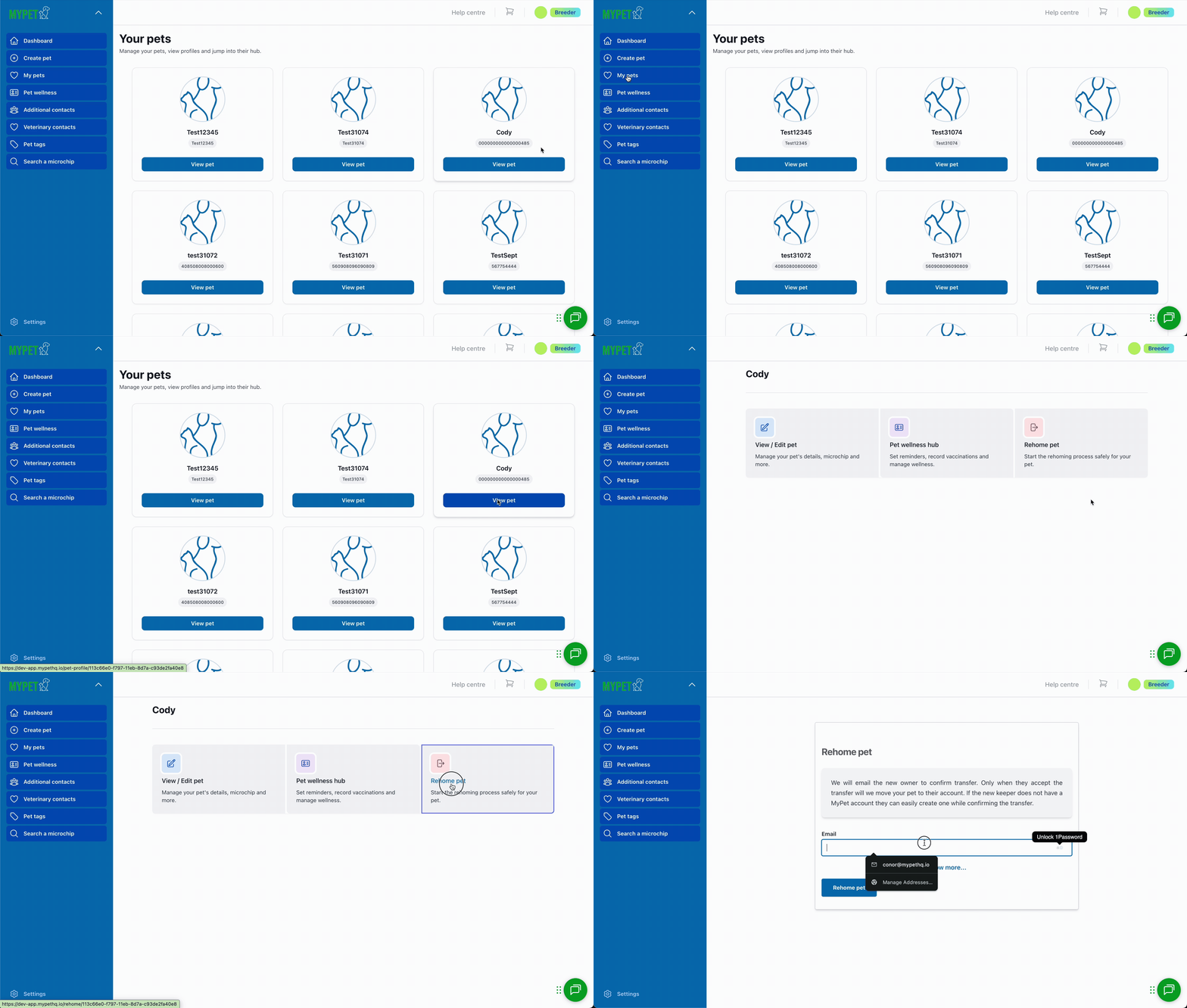
Once logged in, go to My Pets, then click on the pet you wish to transfer to a new owner. You can then scroll to the bottom and Click Rehome pet
![Breeder rehome-1](https://support.mypethq.io/hs-fs/hubfs/Breeder%20rehome-1.gif?width=670&height=380&name=Breeder%20rehome-1.gif)

#### Step 3

After clicking this button you are able to enter the new owner’s / keeper’s details. At a minimum you need to enter their email address. You can click Show More to enter all the new owner’s / keeper’s details. After you’ve entered all the details click Rehome. You will then see a message letting you know the process has been started successfully.

![](https://mypethq.io/wp-content/uploads/2025/04/Rehome-Step-2.gif)

#### Step 4

The new owner / keeper will then get the email shown below.

![](https://mypethq.io/wp-content/uploads/2025/04/image-3-1024x832.png)

#### Step 5

After clicking the link in the email, the transfer will complete. We will email you when this happens.

![](https://mypethq.io/wp-content/uploads/2025/04/image-4-1024x746.png)


The pet is only transferred when the new owner confirms. They will get an email instantly when you click re-home. If they can’t see it, ask them to check their junk folder just in case. 🙂

We will send 3 reminders if they don't confirm the transfer. We will send a reminder 3 days later, 7 days later and 14 days later. 

#### Step 6

The new keeper / owner will then have the chance to set up their account.

![](https://mypethq.io/wp-content/uploads/2025/04/Rehome-Step-3.gif)

- [I'm a pet owner](https://support.mypethq.io/im-a-pet-owner?hsLang=en-gb#main-content)

    - [Premium plans](https://support.mypethq.io/im-a-pet-owner?hsLang=en-gb#premium-plans)
- [I'm from a veterinary practice](https://support.mypethq.io/im-from-a-veterinary-practice?hsLang=en-gb#main-content)

    - [Using MyVet](https://support.mypethq.io/im-from-a-veterinary-practice?hsLang=en-gb#using-myvet)
- [I'm from an animal rescue](https://support.mypethq.io/im-from-an-animal-rescue?hsLang=en-gb#main-content)

    - [Registering MyPet Microchips](https://support.mypethq.io/im-from-an-animal-rescue?hsLang=en-gb#registering-mypet-microchips)
- [I'm a microchip implanter](https://support.mypethq.io/im-a-microchip-implanter?hsLang=en-gb)
- [I'm a breeder](https://support.mypethq.io/im-a-breeder?hsLang=en-gb#main-content)

    - [Implanter Registration tools](https://support.mypethq.io/im-a-breeder?hsLang=en-gb#implanter-registration-tools)
- [I'm a pet professional (Local council, Police etc)](https://support.mypethq.io/im-a-pet-professional-local-council-police-etc?hsLang=en-gb)
- [General](https://support.mypethq.io/general?hsLang=en-gb)

[![](https://support.mypethq.io/hs-fs/hubfs/main_logo_without_tagline.png?width=50&height=59&name=main_logo_without_tagline.png)](http://mypethq.io)

MyPet Headquarters Ltd

<https://www.facebook.com/> <https://www.twitter.com/> <https://www.instagram.com/> <https://podcasts.apple.com/> [mailto:email@email.com](mailto:email@email.com)

Copyright © 2025, MyPet