---
title: How to send yourself an updated Microchip Registration
description: Learn how to email yourself an updated microchip registration certificate in the MyPet app, or order a printed copy for £12. Available on Pampered & Protected.
---
[Skip to content](https://support.mypethq.io/how-to-send-yourself-an-updated-microchip-registration#main-content)
English - United Kingdom
Show submenu for translations
[Customer portal](https://supportportal.mypethq.io/tickets-view?hsLang=en-gb)

- [Back to main website](https://mypethq.io/)
Open main navigation
Close main navigation
- [Back to main website](https://mypethq.io/)
- English - United Kingdom
Show submenu for translations
- [Customer portal](https://supportportal.mypethq.io/tickets-view)
- [Support request](https://mypethq.io/open-a-support-ticket/)
[Support request](https://mypethq.io/open-a-support-ticket/)
How can we help you?
- There are no suggestions because the search field is empty.
1. [Help Centre](https://support.mypethq.io/?hsLang=en-gb)
2. [I'm a pet owner](https://support.mypethq.io/im-a-pet-owner?hsLang=en-gb)
3. [Premium plans](https://support.mypethq.io/im-a-pet-owner?hsLang=en-gb#premium-plans)
2 June 2026
# How to send yourself an updated Microchip Registration
## Updated your pet’s details and need a fresh copy of their microchip registration certificate? You can email yourself the digital certificate in just a few taps.
Available for Protected and Pampered Members
#### Step 1 — Log in to your account
Head to [app.mypethq.io/login](https://app.mypethq.io/login) and sign in with your email and password. Forgotten your password? Click **Forgot password** on the login screen, or see [How do I reset my password for my account?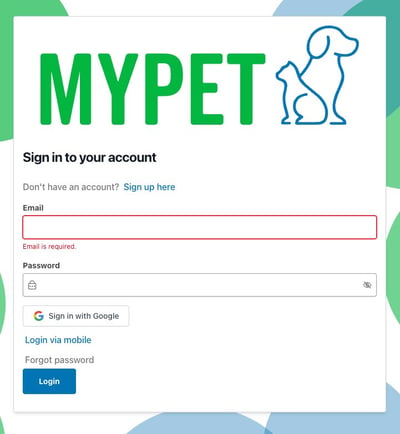](https://support.mypethq.io/how-do-i-reset-my-password-for-my-account?hsLang=en-gb)
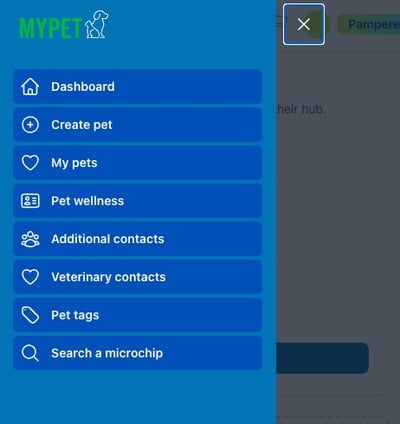
#### Step 2 — Open My pets
From the menu, click **My pets**.
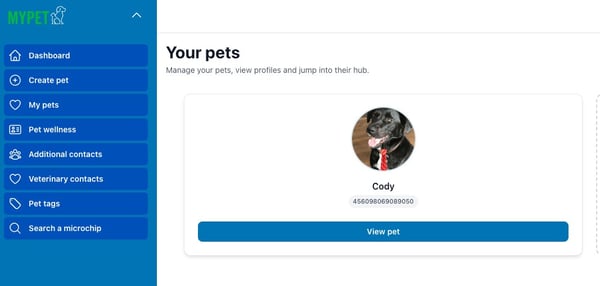
####  Step 3 — Choose your pet
Find the pet you need the certificate for and click **View pet**.
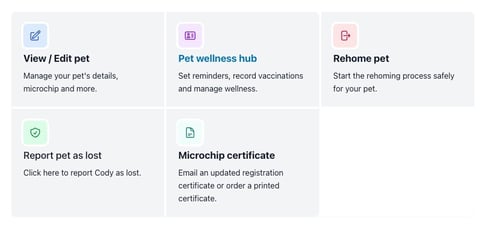
####  Step 4 — Open the Microchip certificate section
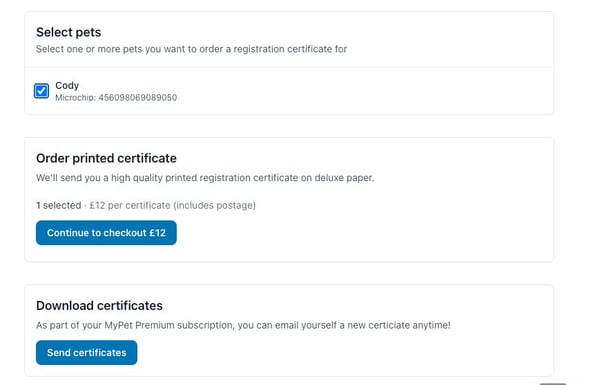
On your pet’s hub, click **Microchip certificate**. From here you can email an updated registration certificate or order a printed copy.
####  Step 5 — Send or order your certificate
Tick the pet(s) you want a certificate for, then choose one of the following:
- **Send certificates** — under *Download certificates*, click **Send certificates**. Available to Pampered and Protected members. Your updated certificate will be emailed to the address on your account.
- **Order a printed certificate** — under *Order printed certificate*, click **Continue to checkout**. £12 per certificate (includes postage), available on any plan. See [How can I get a printed copy of my pet’s registration certificate?](https://support.mypethq.io/how-can-i-get-a-printed-copy-of-my-pets-registration-certificate?hsLang=en-gb).
#### That’s it!
Once you click **Send certificates**, your updated certificate will arrive by email. If it doesn’t show up within a few minutes, check your spam folder and make sure your account email is up to date ([How do I change my email address?](https://support.mypethq.io/how-do-i-change-my-email-address?hsLang=en-gb)).
Still need a hand? Visit our [Help Centre](https://support.mypethq.io/?hsLang=en-gb) or [open a support ticket](https://mypethq.io/open-a-support-ticket/).
- [I'm a pet owner](https://support.mypethq.io/im-a-pet-owner?hsLang=en-gb#main-content)
- [Premium plans](https://support.mypethq.io/im-a-pet-owner?hsLang=en-gb#premium-plans)
- [I'm from a veterinary practice](https://support.mypethq.io/im-from-a-veterinary-practice?hsLang=en-gb#main-content)
- [Using MyVet](https://support.mypethq.io/im-from-a-veterinary-practice?hsLang=en-gb#using-myvet)
- [I'm from an animal rescue](https://support.mypethq.io/im-from-an-animal-rescue?hsLang=en-gb#main-content)
- [Registering MyPet Microchips](https://support.mypethq.io/im-from-an-animal-rescue?hsLang=en-gb#registering-mypet-microchips)
- [I'm a microchip implanter](https://support.mypethq.io/im-a-microchip-implanter?hsLang=en-gb)
- [I'm a breeder](https://support.mypethq.io/im-a-breeder?hsLang=en-gb#main-content)
- [Implanter Registration tools](https://support.mypethq.io/im-a-breeder?hsLang=en-gb#implanter-registration-tools)
- [I'm a pet professional (Local council, Police etc)](https://support.mypethq.io/im-a-pet-professional-local-council-police-etc?hsLang=en-gb)
- [General](https://support.mypethq.io/general?hsLang=en-gb)
[](http://mypethq.io)
MyPet Headquarters Ltd
[mailto:email@email.com](mailto:email@email.com)
Copyright © 2025, MyPet