---
title: Registering microchips using MyVet
description: Registering microchips using myVet
---

[Skip to content](https://support.mypethq.io/registering-microchips-using-myvet#main-content)

English - United Kingdom

Show submenu for translations

[Customer portal](https://supportportal.mypethq.io/tickets-view?hsLang=en-gb)

![sage logo](https://support.mypethq.io/hs-fs/hubfs/sage%20logo.png?width=65&height=77&name=sage%20logo.png)

- [Back to main website](https://mypethq.io/)

Open main navigation

Close main navigation

- [Back to main website](https://mypethq.io/)
- English - United Kingdom
  
  Show submenu for translations
- [Customer portal](https://supportportal.mypethq.io/tickets-view)
- [Support request](https://mypethq.io/open-a-support-ticket/)

[Support request](https://mypethq.io/open-a-support-ticket/)

 How can we help you?

- There are no suggestions because the search field is empty.

1. [Help Centre](https://support.mypethq.io/?hsLang=en-gb)
2. [I'm from a veterinary practice](https://support.mypethq.io/im-from-a-veterinary-practice?hsLang=en-gb)
3. [Using MyVet](https://support.mypethq.io/im-from-a-veterinary-practice?hsLang=en-gb#using-myvet)

23 September 2025

# Registering microchips using MyVet

First login to MyVet here: [https://myvet.mypethq.io/login](https://myvet.mypethq.io/login)

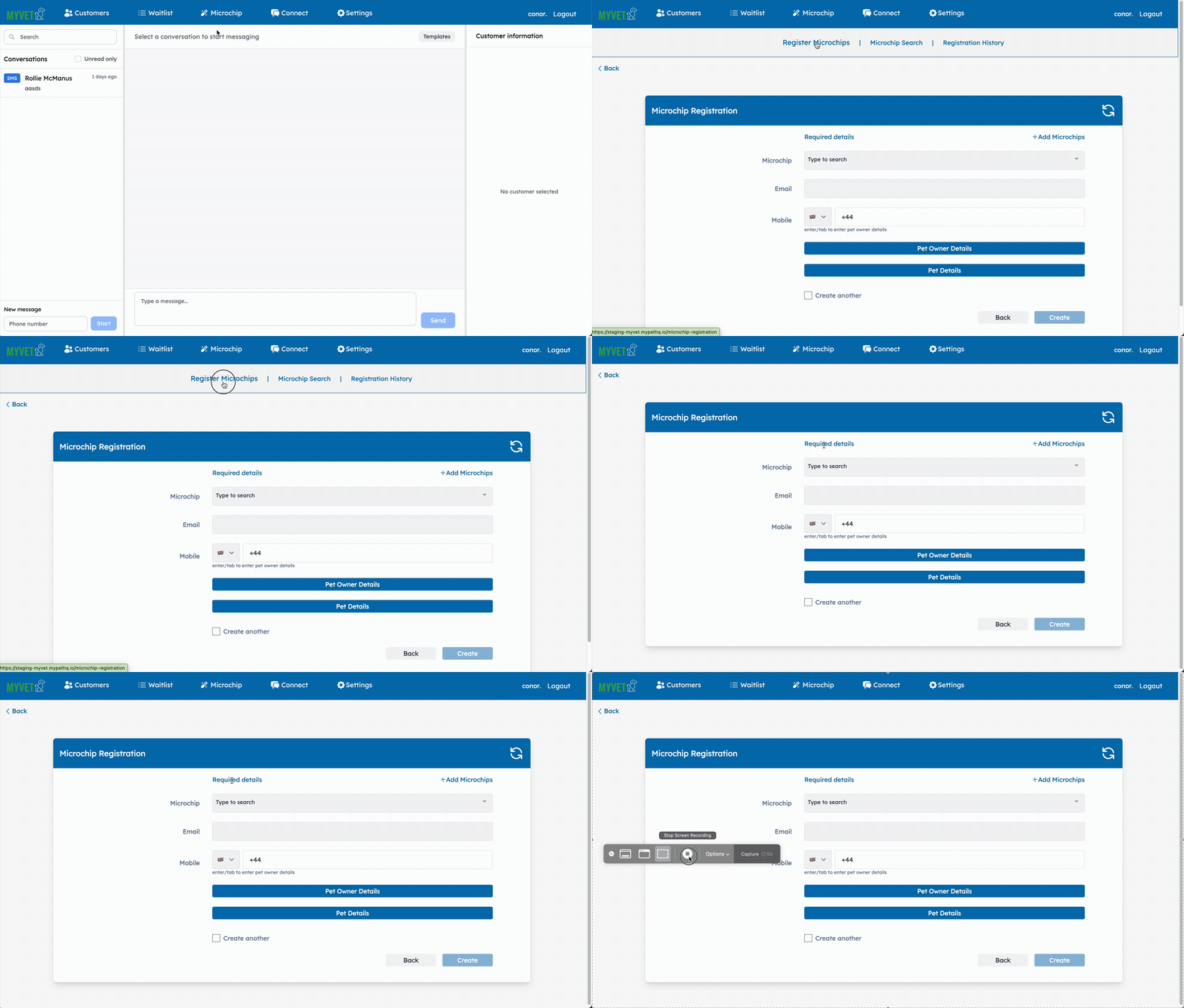
The next step is to click on Microchips and then register microchips as shown below:
![Register on myvet1](https://support.mypethq.io/hs-fs/hubfs/Register%20on%20myvet1.gif?width=670&height=381&name=Register%20on%20myvet1.gif)

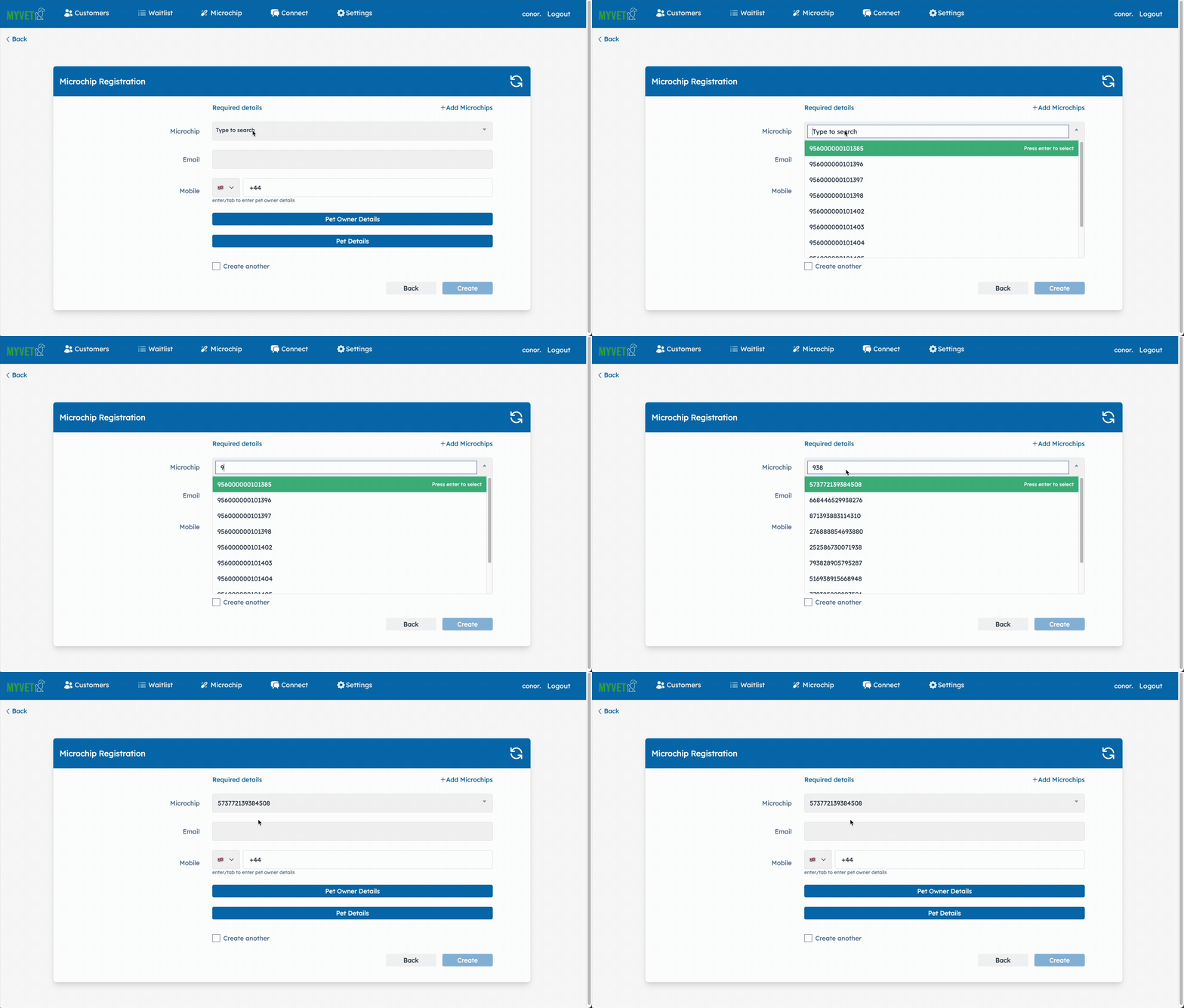
The next step is to enter a few of the digits of the microchip to search for it as shown below. 

We upload your microchips to MyVet when you purchase from us! If you buy from a wholesaler you can add your own microchips by following the steps in [THIS ARTICLE](https://support.mypethq.io/how-to-add-microchips-to-myvet?hsLang=en-gb). 

![Register on myvet2](https://support.mypethq.io/hs-fs/hubfs/Register%20on%20myvet2.gif?width=670&height=381&name=Register%20on%20myvet2.gif)

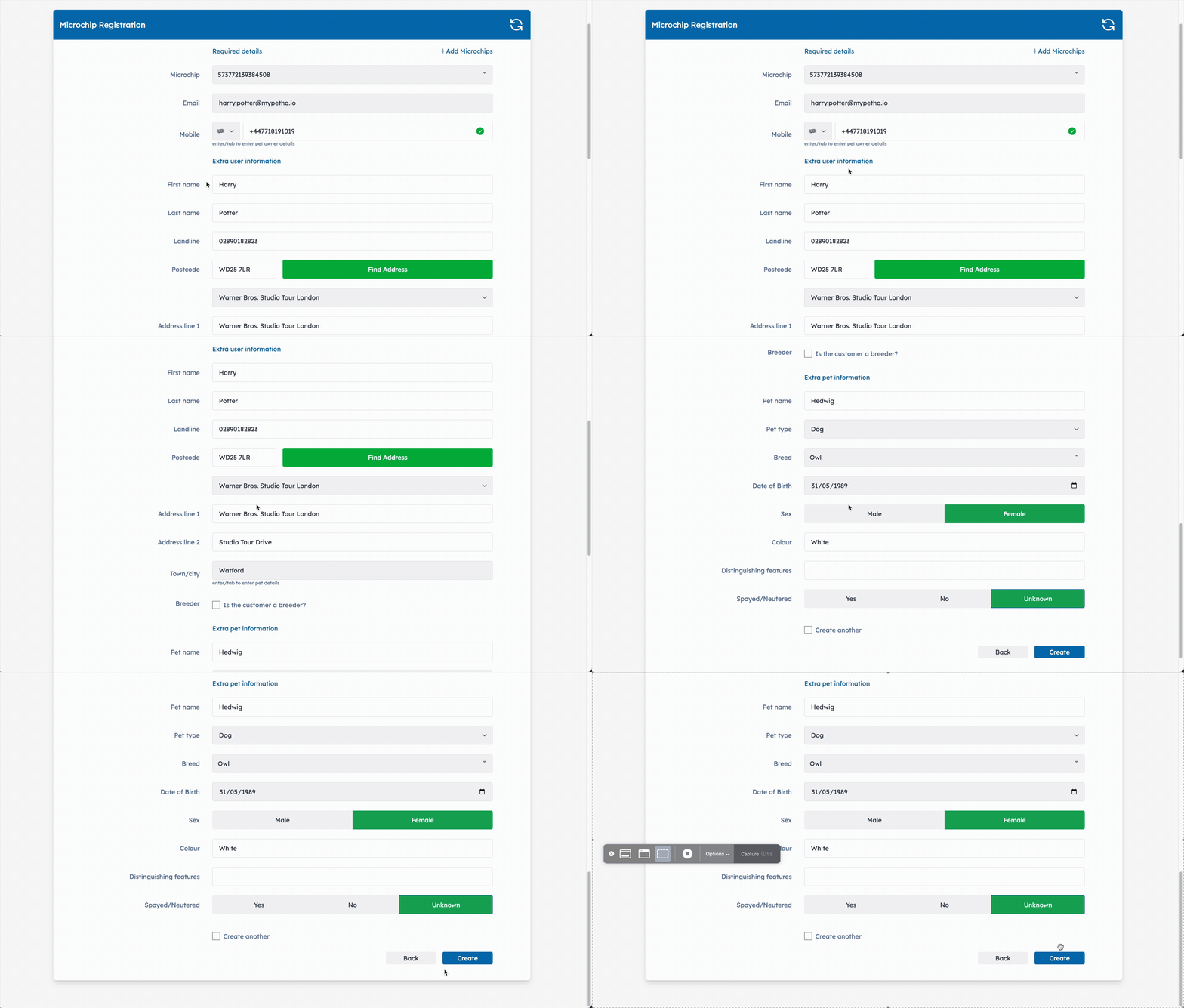
The next step is adding the owner and pet details. At a minimum you can add either the email / mobile number and we will then follow up with them several times to get all of their details. You can also add the additonal details by clicking on each section. 
![Register on MyVet3](https://support.mypethq.io/hs-fs/hubfs/Register%20on%20MyVet3.gif?width=670&height=381&name=Register%20on%20MyVet3.gif)

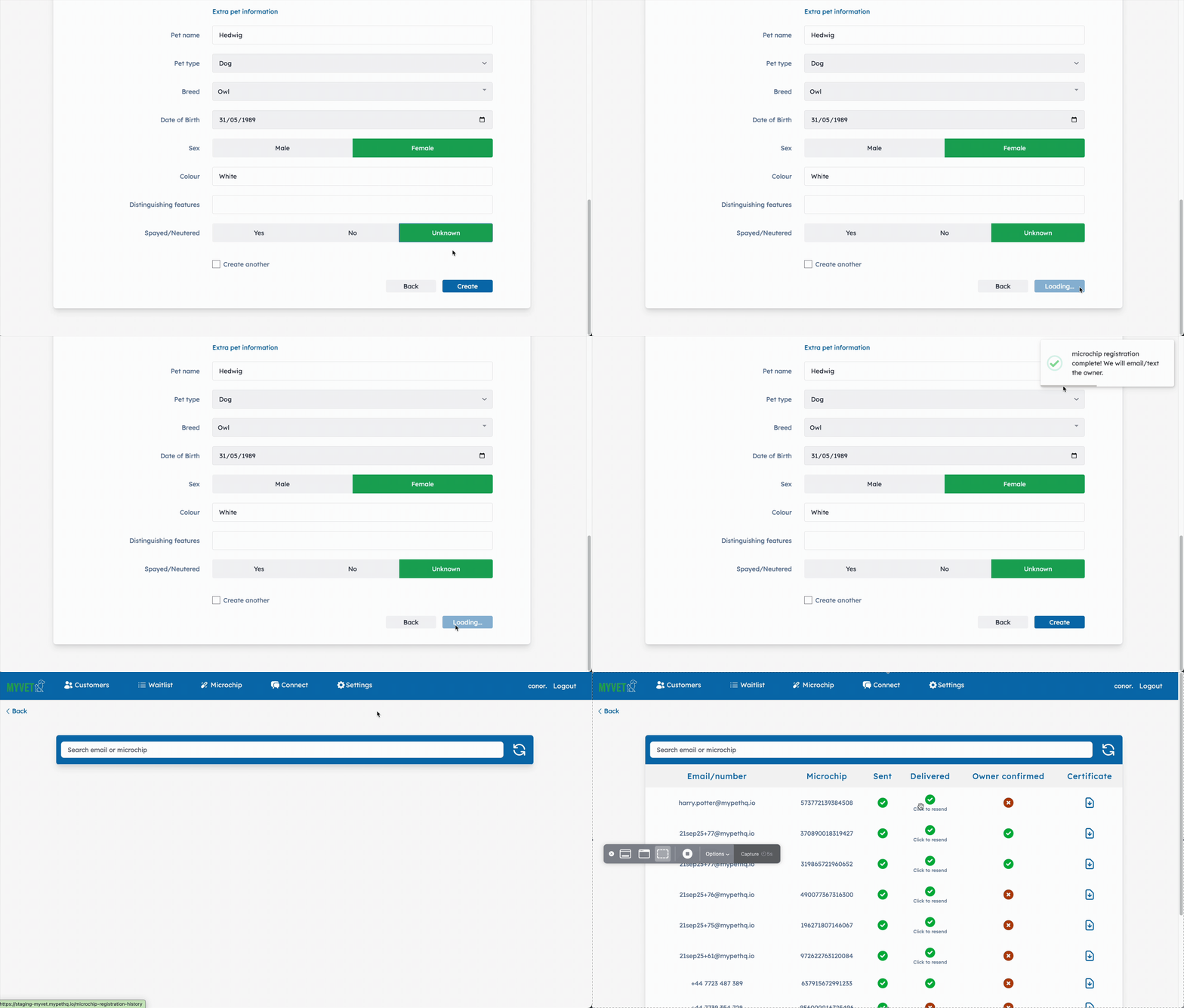
Once you click Create we'll register the pet and send the pet owner and email to confirm all of the details. 

We will follow up with the pet owner several times over 2 weeks to get them to confirm all of their details!
#### **![Register on MyVet4](https://support.mypethq.io/hs-fs/hubfs/Register%20on%20MyVet4.gif?width=670&height=381&name=Register%20on%20MyVet4.gif)**

#### **You’re all done**

You can also watch this video which walks you though the whole process:

<iframe data-hsv-src="https://play.hubspotvideo.com/v/4919543/id/166381478539?color=0&amp;play_button_color=0" referrerpolicy="origin" sandbox="allow-forms allow-scripts allow-same-origin allow-popups" allow="autoplay; fullscreen;" style="position: absolute !important; width: 100% !important; height: 100% !important; left: 0; top: 0; border: 0 none; pointer-events: initial" title="HubSpot Video" loading="lazy" data-hsv-id="166381478539" data-hsv-style="" data-hsv-color="0" data-hsv-play-button-color="0" data-hsv-width="1280" data-hsv-height="720" data-hsv-autoplay="false" data-hsv-loop="false" data-hsv-muted="false" data-hsv-hidden-controls="false" data-hsv-full-width="false"></iframe>


- [I'm a pet owner](https://support.mypethq.io/im-a-pet-owner?hsLang=en-gb#main-content)

    - [Premium plans](https://support.mypethq.io/im-a-pet-owner?hsLang=en-gb#premium-plans)
- [I'm from a veterinary practice](https://support.mypethq.io/im-from-a-veterinary-practice?hsLang=en-gb#main-content)

    - [Using MyVet](https://support.mypethq.io/im-from-a-veterinary-practice?hsLang=en-gb#using-myvet)
- [I'm from an animal rescue](https://support.mypethq.io/im-from-an-animal-rescue?hsLang=en-gb#main-content)

    - [Registering MyPet Microchips](https://support.mypethq.io/im-from-an-animal-rescue?hsLang=en-gb#registering-mypet-microchips)
- [I'm a microchip implanter](https://support.mypethq.io/im-a-microchip-implanter?hsLang=en-gb)
- [I'm a breeder](https://support.mypethq.io/im-a-breeder?hsLang=en-gb#main-content)

    - [Implanter Registration tools](https://support.mypethq.io/im-a-breeder?hsLang=en-gb#implanter-registration-tools)
- [I'm a pet professional (Local council, Police etc)](https://support.mypethq.io/im-a-pet-professional-local-council-police-etc?hsLang=en-gb)
- [General](https://support.mypethq.io/general?hsLang=en-gb)

[![](https://support.mypethq.io/hs-fs/hubfs/main_logo_without_tagline.png?width=50&height=59&name=main_logo_without_tagline.png)](http://mypethq.io)

MyPet Headquarters Ltd

<https://www.facebook.com/> <https://www.twitter.com/> <https://www.instagram.com/> <https://podcasts.apple.com/> [mailto:email@email.com](mailto:email@email.com)

Copyright © 2025, MyPet

```json
{
  "@context" : "https://schema.org",
  "@type" : "VideoObject",
  "contentUrl" : "https://4919543.fs1.hubspotusercontent-na1.net/hubfs/4919543/Registering%20a%20pet%20with%20MyVet%20(1).mp4",
  "dateModified" : "2025-02-25T23:24:52.491Z",
  "duration" : "PT4M29.653S",
  "height" : 720,
  "name" : "Registering a pet with MyVet (1)",
  "thumbnailUrl" : "https://support.mypethq.io/hubfs/Registering%20a%20pet%20with%20MyVet%20(1).mp4/medium.jpg",
  "uploadDate" : "2024-05-04T09:07:16.382Z",
  "width" : 1280
}
```